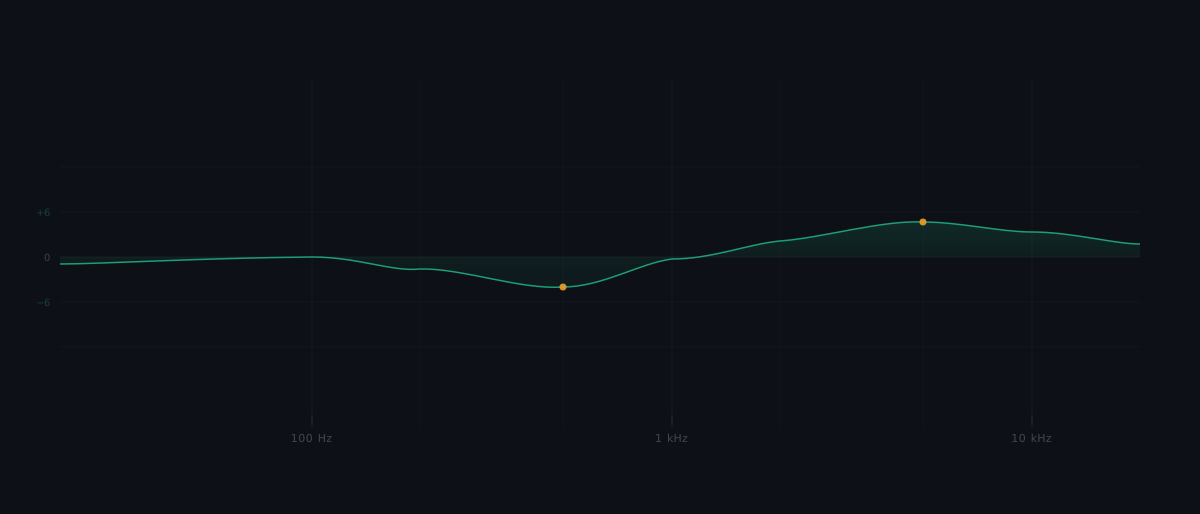
You open an EQ plugin on a vocal that sounds dull, boost a wide band around 3 kHz because a tutorial recommended it, and now the vocal cuts through. Problem solved. Except the guitars were already occupying that range, and now the vocal and guitars are fighting for the same space. You have not fixed a frequency problem. You have created a new one.
This is what happens when producers use equalization without understanding what it actually does. EQ is not a "make it sound better" button. It is the primary tool for shaping how every track in your mix occupies the frequency spectrum, and using it effectively requires a framework, not a preset.
What equalization actually does to an audio signal
Equalization (EQ) is the process of adjusting the amplitude of specific frequency ranges within an audio signal. That is the entire mechanism: you select a frequency range and make it louder or quieter relative to the rest of the signal. Nothing is added. Nothing new is generated. The existing frequency content is redistributed.
This distinction matters because it separates EQ from every other processing tool in your chain. Compression changes the dynamic range of a signal. Distortion generates new harmonic content. Reverb adds reflections that did not exist in the original recording. EQ does none of these things. It reshapes what is already there.
EQ operates in the frequency domain, which means it works across the range of pitches your audio contains. Human hearing spans approximately 20 Hz (a deep sub-bass rumble) to 20 kHz (the highest audible shimmer). Every sound you record, from a kick drum to a vocal to a cymbal, contains energy distributed across portions of that range. EQ lets you decide how much energy sits in each portion.
What is equalization in music production? Equalization is the process of adjusting the amplitude of specific frequency ranges in an audio signal. It reshapes the tonal balance of a sound without adding new content, making it the primary tool for resolving frequency conflicts between tracks in a mix.
Why equalization is the most-used mixing tool
Every recorded source occupies a range of frequencies, and those ranges overlap. A bass guitar and a kick drum both produce energy below 100 Hz. A vocal and an electric guitar both concentrate energy in the 1-5 kHz range. Acoustic recordings capture room resonances that stack up in the low-mids across every microphone.
Without EQ, a mix is a frequency collision. Every track competes for the same spectral territory, and the result is a wall of sound where nothing is distinct. This is why home producers often describe their mixes as "muddy" or "cluttered." The individual tracks may sound fine alone, but combined, their overlapping frequencies pile up into a dense, indistinct mass.
EQ is how mixers resolve those conflicts. It carves space for each element by reducing the frequencies where tracks compete and emphasising the frequencies that give each track its identity. This is not about making individual tracks sound impressive in isolation. It is about making every track work as part of a balanced whole.
The problem EQ solves (and the one it does not)
The difference between effective and ineffective EQ comes down to one question: are you solving a specific frequency problem, or are you making arbitrary adjustments?
Effective EQ starts with a problem. Something in the mix sounds wrong: a vocal is buried, a snare is harsh, the low end is boomy. The producer identifies the specific frequency range causing the issue and makes a targeted correction. The correction is evaluated not by how the track sounds alone, but by how it sits in the full mix after the change.
Ineffective EQ starts with a preset, a tutorial recommendation, or a vague sense that something needs to "sound better." The producer boosts or cuts without identifying a specific problem, and the result is unpredictable. Sometimes it works by accident. More often, it shifts one frequency conflict into another. EQ is about making space and correcting imbalances, and that distinction is the foundation of the framework that follows.
The EQ decision framework: identify, choose, verify
Every EQ decision can be structured as three sequential steps. This framework applies whether you are EQ'ing a single vocal or shaping a full drum bus.
The three EQ operations
Before applying the framework, you need to understand the three fundamental operations that every EQ offers.
Cutting (subtractive EQ) reduces the amplitude of a specific frequency range. Use it to remove problematic energy: low-end rumble, resonant peaks, harsh upper-mid buildup.
Boosting (additive EQ) increases the amplitude of a specific frequency range. Use it to emphasise a desired characteristic: vocal presence, snare crack, the "air" above a mix.
Filtering and shelving shapes the broad spectral envelope of the signal. A high-pass filter (HPF) attenuates everything below a set cutoff frequency, removing rumble and low-frequency noise. A low-pass filter (LPF) attenuates everything above a set cutoff, taming harshness or removing hiss. Shelf filters boost or cut everything above or below a target frequency by a fixed amount.
Step 1: Identify the frequency problem
Listen to the track in the context of the full mix, not in solo. Ask one question: what is wrong?
The answer should be specific. "It sounds bad" is not a frequency problem. "The vocal is being masked by the guitars in the 2-4 kHz range" is a frequency problem. "The bass is boomy around 200 Hz" is a frequency problem. "There is a harsh resonance in the snare around 800 Hz" is a frequency problem.
Common frequency problems have common names. Muddiness is typically low-mid buildup between 200 and 500 Hz. Harshness usually lives in the 2-5 kHz range. Boominess is excess energy below 200 Hz. Dullness is a lack of energy above 8 kHz. These are starting points, not absolute rules, because the specific frequencies depend on the source material.
Step 2: Choose the correction
Once you have identified the problem, choose the simplest EQ operation that addresses it.
If the problem is unwanted energy (rumble, resonance, muddiness, harshness), cut first. Subtractive EQ tends to produce cleaner, more transparent results than additive EQ because it removes energy without increasing the overall signal level. A 3 dB cut at a problem frequency often achieves what a producer might otherwise attempt with a boost elsewhere.
If the problem is missing character (dullness, lack of presence, thin low end), and cutting competing tracks has not solved it, then boost. Additive EQ emphasises a desired characteristic, but it also increases the signal level in that range, which can introduce new conflicts with other tracks.
If the problem is broad spectral shape (unnecessary sub-bass content across all tracks, excessive high-frequency noise), use filters. A high-pass filter on most non-bass tracks is one of the most impactful EQ moves in any mix because it removes low-frequency content that contributes to muddiness without affecting the track's audible character.
Should I cut or boost with EQ? Start with cuts. Subtractive EQ (cutting) tends to produce cleaner results because it removes unwanted energy without increasing the overall signal level. Boost only when cutting alone does not achieve the desired result.
Step 3: Verify in context
Every EQ move must be checked with the full mix playing. This is not optional. EQ decisions on one track change the perceived balance of every other track in the mix. A cut that sounds hollow in solo may sound perfectly transparent in the full mix because other tracks fill the gap. A boost that sounds great in solo may push the track into a frequency range where it now competes with something else.
Toggle the EQ bypass while the full mix plays. If the mix improves with the EQ engaged, the move is working. If you cannot hear a clear improvement in the mix (not just the soloed track), the EQ move is either unnecessary or targeting the wrong frequency.
Why should I avoid EQ'ing in solo? EQ decisions on one track change the perceived balance of every other track. A move that sounds wrong in solo may sound correct in the full mix, and a move that sounds great in solo may create new frequency conflicts when other tracks are playing.
Parametric, graphic, and dynamic EQ: which tool for which job
Your DAW likely includes several EQ types. Each suits different situations. They are not a hierarchy of quality; they are tools designed for different jobs.
Parametric EQ is the most common and most versatile EQ in modern mixing. Each band offers three adjustable parameters: frequency (the centre point of the adjustment), gain (how much you boost or cut), and Q (the bandwidth, or how wide or narrow the adjustment is). A narrow Q targets a specific resonance. A wide Q shapes a broad range. Parametric EQ is the right tool for most mixing situations because it gives precise control over exactly where and how much you adjust.
Graphic EQ divides the spectrum into fixed frequency bands (commonly 10 or 31 bands), each with its own gain slider. You cannot change the frequency centres or the bandwidth. This makes graphic EQ better for broad tonal shaping (adjusting the overall brightness or warmth of a signal) than for surgical corrections. You will encounter graphic EQ in live sound mixing and on some hardware units more often than in DAW-based studio work.
Dynamic EQ combines equalization with threshold-based processing. It applies gain changes only when the signal exceeds a set threshold at the target frequency. This makes it useful for problems that are inconsistent: a vocal that becomes harsh only on certain loud phrases, or a bass that booms only on specific notes. Where a static EQ cut would affect the signal constantly, a dynamic EQ cut engages only when the problem appears. For producers exploring how automatic equalization can streamline their workflow, dynamic EQ represents the bridge between manual correction and automated frequency management.
Applying the framework: a vocal competing with guitars
Here is the three-step framework applied to a real scenario that most producers encounter.
The situation: You have a vocal track and an electric guitar, and the vocal sounds buried whenever the guitar plays. Both tracks sound fine in solo, but together, the vocal disappears.
Step 1 (Identify): Listen to both tracks together. The masking is concentrated in the 2-4 kHz range, where the vocal's presence and the guitar's bite overlap. This is a frequency conflict between two sources occupying the same spectral space.
Step 2 (Choose): The problem is unwanted energy in the guitar track competing with the vocal. Cut the guitar by 2-3 dB in the 2-4 kHz range with a moderate Q. This is subtractive EQ: removing the specific frequency energy that causes the masking. Do not boost the vocal at 3 kHz as a first move. That would increase the vocal's level in a contested range, potentially creating a new conflict and raising the overall signal level unnecessarily.
Step 3 (Verify): Play the full mix. The vocal now sits forward without being louder. The guitar still has body and weight from its lower frequencies; it just no longer competes with the vocal for the same presence range. If the guitar sounds too dull after the cut, narrow the Q to affect a smaller range, or reduce the cut to 1-2 dB. The point is not to eliminate the guitar's midrange but to create enough space for both sources to coexist.
This is the framework in action. The problem was identified before any control was touched. The correction was chosen based on the specific type of problem. The result was verified in the full mix, not in solo.
Where the framework breaks down
No framework is universal, and this one has clear boundary conditions.
Creative EQ operates outside the framework. Extreme filtering for a telephone effect, aggressive boosts for lo-fi character, or resonant peaks for sound design are all valid uses of EQ that do not start with "identify a frequency problem." When EQ is a creative tool rather than a corrective one, the identify-choose-verify model does not apply. The goal is a specific aesthetic result, not frequency conflict resolution.
Mastering EQ requires a different approach. EQ applied to a stereo master affects the entire frequency balance at once. Cutting 200 Hz on a master does not just reduce the bass; it reduces every instrument that has energy at 200 Hz. The framework's "cut the competing track" logic assumes you can isolate individual sources. In mastering, you cannot. Master equalization requires a broader perspective on tonal balance rather than per-source conflict resolution.
EQ cannot fix a flawed recording. If the source recording is fundamentally compromised (wrong microphone choice, severe room resonances, clipping distortion), EQ can redistribute the frequency energy, but it cannot add what was never captured and it cannot remove distortion baked into the signal. In these cases, re-recording is the real solution. EQ is damage limitation.
Common EQ mistakes and how to avoid them
Each of these mistakes maps directly to a skipped step in the framework.
Boosting without identifying a problem. This skips Step 1. The producer opens an EQ, boosts 5 kHz "for presence," and moves on without asking whether the track actually lacked presence or whether that boost now conflicts with another track. Fix: always name the problem before touching a control.
EQ'ing in solo. This skips Step 3. The track sounds great on its own, but the producer never checks the result with the full mix playing. Solo is useful for identifying a resonance or a specific frequency issue, but every final EQ decision must be evaluated in context.
Skipping high-pass filters. Most non-bass tracks contain low-frequency energy that is inaudible on its own but stacks up across multiple tracks, adding muddiness. A high-pass filter set between 60 and 120 Hz (depending on the source) removes this energy cleanly. Producers dealing with low-end mixing challenges often find that high-pass filtering on non-bass tracks resolves more problems than any amount of bass EQ.
Over-processing. Making six EQ moves when two would achieve the same result. Every additional EQ band introduces phase shift and changes the signal in ways beyond the intended frequency adjustment. If a track needs extensive EQ to sit in the mix, the problem may be the arrangement, the recording, or the monitoring environment, not the EQ settings.
The framework in one sentence
Effective equalization means identifying a specific frequency problem, choosing the simplest correction (cuts before boosts), and verifying every move with the full mix playing.
That single process separates intentional EQ from guesswork. It applies to a single vocal track and to a full drum bus. It works with a parametric EQ, a graphic EQ, or a dynamic EQ. The tool changes; the framework stays the same. Build the habit of naming the problem before reaching for any EQ control, and your mixes will get cleaner, faster.
To assess how your EQ decisions are translating, tools like the frequency response curve and tonal balance summary provide objective frequency analysis that can confirm whether your corrections are landing where you intend them to.
Equalization is the process of selectively boosting or cutting specific frequency ranges in an audio signal to reshape its tonal balance. It is the primary tool for resolving frequency conflicts between tracks in a mix. Effective EQ follows a three-step framework: identify the frequency problem, choose the simplest correction (defaulting to cuts over boosts), and verify the result with the full mix playing.