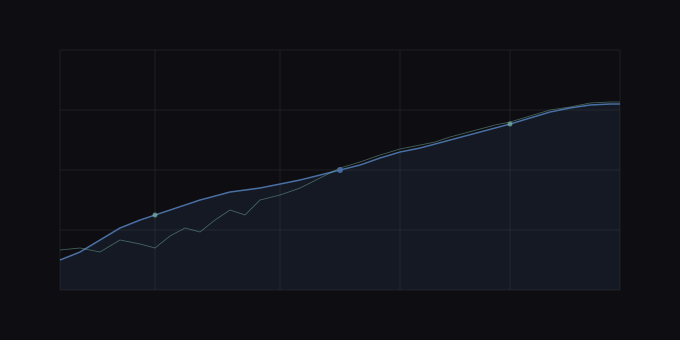
Mixes with unclear frequency balance are difficult to assess subjectively. The frequency response curve transforms raw spectral data into a perceptually meaningful visualization that makes energy concentrations, rolloffs, and problem areas immediately visible, revealing what linear-spaced charts obscure.
What the frequency response curve reveals about your mix
A frequency response curve is a 100-point spectral plot showing average energy distribution from 20Hz to 20kHz (Source: inputs/articles/frequency-response-curve/brief.md#Core message). It provides a visual representation of your mix's frequency "shape", revealing where energy concentrates, where it rolls off, and where peaks or dips exist.
This visualization makes subjective tonal balance objectively visible. Instead of relying on ear fatigue or room acoustics to detect muddy low-mids or overly bright highs, you see the frequency distribution as a measurable curve. The curve shows you what's happening across the entire spectrum simultaneously, giving you a complete picture of your mix's tonal character.
The data exists as a continuous line showing amplitude in decibels at each frequency point. Sharp peaks indicate resonances or overemphasis. Steep rolloffs reveal frequency ranges with insufficient energy. A rising curve from low to high frequencies suggests a bright mix. A falling curve indicates a dark or bass-heavy balance.
How the curve is built: from STFT to 100-point visualization
The frequency response curve generation follows a three-stage pipeline: spectral analysis, averaging, and logarithmic resampling.
The process begins with a Short-Time Fourier Transform (STFT) computed on a mono downmix of your audio file (Source: inputs/articles/frequency-response-curve/brief.md#Page structure - How the curve is built: backend processing). The STFT uses a 2048-sample window with a 512-sample hop and a Hann window function (Source: inputs/articles/frequency-response-curve/brief.md#Key accuracy requirements). These parameters balance frequency resolution against time-domain precision.
The STFT produces a magnitude spectrum for each time frame. These spectra are averaged across all frames to create a single representative magnitude spectrum, then converted to decibels (Source: inputs/articles/frequency-response-curve/brief.md#Page structure - How the curve is built: backend processing). This averaging step removes time-varying fluctuations and reveals the overall tonal character of the mix.
The averaged spectrum contains thousands of frequency bins. To create a manageable visualization, the data is resampled to 100 logarithmically-spaced points using numpy's np.logspace function (Source: inputs/articles/frequency-response-curve/brief.md#Key accuracy requirements). Centre frequencies ranging from 20Hz to 20kHz map to the nearest STFT bin (Source: inputs/articles/frequency-response-curve/brief.md#Page structure - How the curve is built: resampling to 100 points).
Each of the 100 data points follows the format {name: Hz, value: dB}, where the name field contains the frequency in hertz and the value field contains the amplitude in decibels (Source: inputs/articles/frequency-response-curve/brief.md#Page structure - How the curve is built: resampling to 100 points). This structure provides both the frequency location and the energy level at that point.
Why logarithmic spacing matters for mix analysis
The choice of logarithmic spacing is not arbitrary. It reflects how human hearing operates.
Human hearing is logarithmic, not linear (Source: inputs/articles/frequency-response-curve/brief.md#Page structure - Why logarithmic spacing matters). We perceive equal pitch changes as equal frequency ratios. The interval from 100Hz to 200Hz (a doubling) feels perceptually identical to the interval from 1kHz to 2kHz (also a doubling) (Source: inputs/articles/frequency-response-curve/brief.md#Page structure - Why logarithmic spacing matters). Both represent one octave.
A linear frequency axis does not match this perception. Linear spacing would compress bass frequencies into a narrow visual region while wasting space on high frequencies (Source: inputs/articles/frequency-response-curve/brief.md#Page structure - Why logarithmic spacing matters). On a linear scale from 0Hz to 20kHz, the range from 20Hz to 200Hz occupies less than 1% of the chart width, even though it spans over three octaves. The range from 10kHz to 20kHz occupies 50% of the chart width, despite representing only one octave.
Logarithmic spacing corrects this mismatch. It gives each octave roughly equal visual width. The octave from 20Hz to 40Hz receives the same chart space as the octave from 10kHz to 20kHz. This allocation matches how your ear weights these frequency ranges.
The practical benefit: bass problems become clearly visible. Most mix issues occur in the bass range, where energy buildup, phase cancellation, and resonances cluster (Source: inputs/articles/frequency-response-curve/brief.md#Page structure - Why logarithmic spacing matters). Logarithmic spacing ensures these problems receive adequate visual representation instead of being compressed into an illegible region at the chart's left edge.
How the curve is rendered: interactive visualization
The 100-point frequency response data is rendered as an interactive area chart using the Recharts library (Source: inputs/articles/frequency-response-curve/brief.md#Page structure - How the curve is rendered: frontend visualization). The chart uses a logarithmic scale on the x-axis (frequency in hertz) and a linear scale on the y-axis (amplitude in decibels) (Source: inputs/articles/frequency-response-curve/brief.md#Page structure - How the curve is rendered: frontend visualization).
The interactive implementation allows hover interaction at each data point (Source: inputs/articles/frequency-response-curve/brief.md#Page structure - How the curve is rendered: frontend visualization). When you hover over any region of the curve, the interface displays the exact frequency and amplitude value for that point. This combination provides both overview (the full curve's shape) and detailed inspection (precise values at specific frequencies).
The area fill beneath the curve provides visual emphasis for regions with high energy. A filled area rising above baseline indicates energy concentration. A filled area near the bottom indicates attenuation or rolloff. The continuous line connecting all 100 points reveals the overall spectral contour.
This visualization approach supports rapid assessment. You can scan the entire frequency range in one view, identify the mix's general tonal slope (rising, falling, or flat), spot peaks or dips, and inspect specific frequency regions by hovering for exact values.
How curve data feeds into automated systems
The frequency response curve data does not exist in isolation. The same 100-point dataset feeds into automated interpretation systems.
The curve data is passed to the interpretSpectrum() function on the frontend (Source: inputs/articles/frequency-response-curve/brief.md#Page structure - How curve data feeds into other outputs). This function computes 5-band averages from the 100 data points (Source: inputs/articles/frequency-response-curve/brief.md#Page structure - How curve data feeds into other outputs). These bands (sub-bass, bass, low-mid, mid, high) collapse the detailed curve into a simplified summary suitable for automated text generation.
The tonal balance summary you see on the analysis page derives from this process. The same STFT data source provides values for both the full 100-point curve and the 5-band energy breakdown (Source: inputs/articles/frequency-response-curve/brief.md#Page structure - How curve data feeds into other outputs). The measurements remain consistent because they originate from the same spectral analysis.
This shared data foundation ensures that what you see in the curve visualization matches what the automated systems report. If the curve shows elevated energy between 200Hz and 500Hz, the 5-band summary will report elevated bass or low-mid energy. If the curve reveals a high-frequency rolloff above 8kHz, the automated summary will note reduced high-frequency content.
The raw curve measurements also feed into AI-driven coaching outputs. When the system generates mix suggestions based on spectral content, it references the same 100-point dataset you inspect visually.
When to use the full curve versus 5-band summary
The full frequency response curve and the 5-band energy summary serve different purposes despite deriving from the same underlying STFT data (Source: inputs/articles/frequency-response-curve/brief.md#Page structure - Comparison with 5-band energy summary).
The full curve provides 100 data points for detailed manual analysis. Use it when you need to identify specific resonances, pinpoint the exact frequency of a buildup, or assess the slope of a rolloff. The granular resolution reveals problems that five broad bands would average away.
The 5-band summary simplifies the data for automated text generation and rapid assessment. It condenses the spectrum into five regions that align with conventional mixing terminology (sub-bass, bass, low-mid, mid, high). This format works better for AI input and for generating natural-language summaries like "elevated low-mid energy" or "insufficient high-frequency extension."
Both views matter. The full curve shows you the detail. The 5-band summary communicates the findings. When you inspect a mix, the curve reveals what to fix. When you document the problem or explain it to a collaborator, the 5-band summary provides the language.
The choice depends on the task. For troubleshooting, use the curve. For communication and automation, use the 5-band summary.
Summary and key takeaways
Logarithmic frequency spacing mirrors human hearing perception, providing perceptually meaningful visualization across the full audio spectrum. The 100-point resolution balances detail with usability, offering enough granularity to reveal specific problems without overwhelming the interface with excessive data.
The curve's shape reveals tonal balance, rolloffs, and problem areas at a glance. A rising curve indicates brightness. A falling curve indicates warmth or darkness. Peaks indicate resonances. Dips indicate attenuation. Steep slopes indicate abrupt transitions or filtering.
The same STFT data feeds both the detailed curve and the simplified 5-band summary. This shared foundation ensures consistency between manual visualization and automated interpretation. The frequency response curve uses logarithmic frequency spacing to provide 100 data points from 20Hz to 20kHz, mirroring human hearing perception and making bass problems clearly visible. The curve reveals energy concentrations and rolloffs, feeding both manual interpretation and automated tonal balance summaries derived from the same STFT data used for 5-band energy analysis.