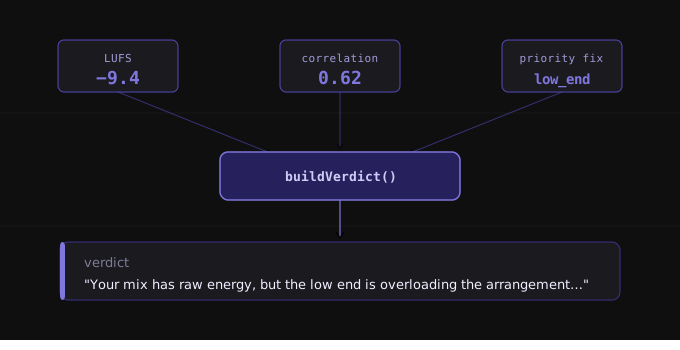
Analysis outputs that present raw data without orienting the user to what's actually wrong create confusion. You see a dozen metrics, a handful of graphs, and several technical readouts, but the question remains: where do I start? The overall verdict distills complex analysis into a single plain-English sentence that immediately tells you what's wrong.
What overall-verdict reveals (and why it matters)
The overall verdict is a single sentence that summarises the most important problem with your mix. It appears directly below the quality tier badge in the diagnosis summary and uses the largest text in that section for immediate visibility (Source: inputs/articles/overall-verdict/brief.md#Core message). This is deliberate: the verdict provides orientation before you engage with detailed metrics or individual fix recommendations.
When an analysis returns multiple potential issues across frequency balance, dynamics, stereo imaging, and loudness, the verdict identifies which issue matters most right now. Rather than presenting you with parallel streams of technical data, the verdict establishes a hierarchy. This allows you to focus your first fix on the problem that has the greatest impact on perceived quality.
The system works because it bridges technical analysis and plain-language guidance. Mix engineers understand terms like "LUFS" and "stereo correlation", but less experienced engineers may not. The verdict translates measurement data into actionable statements that make sense to both groups without requiring interpretation.
How overall-verdict works: technical methodology
The verdict is generated by the buildVerdict() function, which takes three inputs: the LUFS value from loudness analysis, the stereo correlation coefficient from stereo imaging analysis, and the priority fixes array from the AI coaching system (Source: inputs/articles/overall-verdict/brief.md#Key accuracy requirements). These three inputs represent different dimensions of mix quality—loudness, spatial coherence, and frequency/dynamics balance—and together they provide enough context to identify the top-priority issue.
The function first examines the priority fixes array to extract the highest-priority issue detected by the AI. Each issue in that array is categorised by type: clipping, low_end, high_end, mid_range, dynamics, stereo, loudness, or general (Source: inputs/articles/overall-verdict/brief.md#Key accuracy requirements). The detected category determines which verdict template will be used.
Once the category is identified, secondary conditions refine which variant of the template is selected. The LUFS value determines whether the mix is too quiet (significantly below broadcast loudness targets) or too loud (pushing toward or past limiting thresholds). The stereo correlation coefficient determines whether phase coherence problems exist. These secondary conditions ensure the verdict matches the specific context of the issue, not just its category.
The output is a single sentence constructed from one of 14+ verdict templates, each written in plain English and designed to orient the engineer toward the appropriate fix (Source: inputs/articles/overall-verdict/brief.md#Page structure sections). The verdict does not contain technical jargon, numeric thresholds, or frequency-specific guidance—those details appear in the prescription section below.
Interpreting overall-verdict values and outputs
The verdict is not a metric you interpret; it is a statement you act on. Each verdict template corresponds to a specific issue category and provides enough context to understand the nature of the problem without listing individual fixes.
For clipping issues, the verdict states: "Your mix is pushing past 0 dBTP: audible distortion will occur on streaming platform encodes..." This signals that peak levels exceed digital headroom limits and that the issue will manifest as distortion when encoded for streaming (Source: inputs/articles/overall-verdict/brief.md#Page structure sections).
For low-end problems in loud mixes, the verdict reads: "Your mix has raw energy, but the low end is overloading the arrangement..." In mixes that are not loud, the variant is: "Your mix has decent energy, but low-end balance is throwing off..." The distinction matters because the fix differs: overloading low end requires attenuation or surgical EQ, while balance issues may require rebalancing the relationship between kick, bass, and other low-frequency elements (Source: inputs/articles/overall-verdict/brief.md#Page structure sections).
High-end issues produce: "Your mix sounds veiled: it is missing the top-end definition..." This tells you the problem is audible tonal character—lack of clarity or air—rather than a measurement anomaly (Source: inputs/articles/overall-verdict/brief.md#Page structure sections).
Dynamics problems have two variants. Quiet mixes receive: "Your mix is sitting significantly below broadcast loudness targets..." Mixes that are not quiet but have flattened dynamics receive: "Your mix has been over-processed: the dynamics have been squeezed out..." The first points to insufficient loudness; the second points to excessive compression or limiting (Source: inputs/articles/overall-verdict/brief.md#Page structure sections).
Stereo imaging issues also branch based on phase risk. When phase coherence problems are detected: "Your mix has phase coherence problems that would cause significant damage..." Without phase risk: "Your mix has stereo imaging inconsistencies..." The former requires immediate attention because mono compatibility and streaming encodes will degrade the mix. The latter indicates imbalance or width issues that affect perceived quality but do not risk technical failure (Source: inputs/articles/overall-verdict/brief.md#Page structure sections).
If the AI coaching system fails, returns incomplete data, or produces no priority fixes, the system generates a fallback verdict: "This mix shows potential but needs a full assessment across all frequency bands before release" (Source: inputs/articles/overall-verdict/brief.md#Key accuracy requirements). This ensures the UI always provides valid output without breaking the orientation layer.
How overall-verdict integrates with other systems
The verdict is the first layer in a three-part structure. The diagnosis summary presents the verdict alongside the primary issue label and the next step recommendation. All three components occupy a single row in a three-column layout directly below the quality tier badge (Source: inputs/articles/overall-verdict/brief.md#Page structure sections). This layout ensures engineers see the high-level orientation before scrolling to metric cards or detailed prescription sections.
The verdict does not replace the prescription section—it orients toward it. The verdict states what the problem is; the prescription provides the numbers, thresholds, and specific actions required to fix it (Source: inputs/articles/overall-verdict/brief.md#Page structure sections). The verdict is not repeated in the prescription. Instead, the prescription assumes the engineer has already read the verdict and now seeks implementation details.
This separation allows each component to serve a distinct function. Engineers who need immediate context read the verdict. Engineers who need specific guidance read the prescription. Engineers who need to verify measurements or explore alternative fixes engage with the metric cards. The verdict is the entry point, not the endpoint.
The AI coaching system provides the priority fixes array that drives category detection, but the verdict is not an AI-generated string. It is a structured output selected from a finite set of templates based on rule-driven conditions (Source: inputs/articles/overall-verdict/brief.md#Page structure sections). This ensures consistency, avoids ambiguity, and prevents the AI from producing verdicts that contradict measurement data or use language inconsistent with the rest of the interface.
Practical application and workflow
When you receive analysis results, the verdict is the first thing you read. It tells you whether to address frequency balance, dynamics, loudness, or stereo imaging before engaging with detailed metrics. This saves time because it prevents you from exploring every metric card in sequence when only one category requires immediate attention.
If the verdict identifies clipping, your first action is to open the dynamics section and check peak levels. If it identifies low-end overload, you move to the frequency balance section and examine the sub and low-mid regions. The verdict does not tell you how to fix the problem—it tells you where to look.
In cases where multiple issues exist but the verdict highlights only one, the unaddressed issues still appear in the prescription section. The verdict establishes priority; it does not suppress other findings. If your mix has both high-end deficiency and stereo imaging inconsistencies, the verdict will surface the one with greater impact on perceived quality. The prescription will list both.
The verdict is designed to be shared. Engineers working with clients or collaborators can include the verdict in feedback emails or shared documents without needing to attach the full analysis report. The sentence is self-contained and conveys the core issue in language that non-technical stakeholders can understand.
Because the verdict uses category-based templates, repeated use across multiple mixes reveals patterns. If five consecutive mixes produce verdicts about low-end overload, you have a monitoring environment issue or a mixing habit that consistently misjudges low-frequency balance. The verdict becomes diagnostic feedback on your process, not just on individual mixes.
What is overall-verdict?
The overall verdict is a single-sentence, plain-English summary of the most important problem with a mix, generated by the buildVerdict() function using LUFS value, stereo correlation, and AI-detected priority fixes.
How does overall-verdict work?
It extracts the top priority issue from the AI fixes array, categorises it, then applies secondary conditions (too loud/quiet, phase risk) to select the appropriate template variant from 14+ available verdicts.
How do I interpret overall-verdict outputs?
The verdict is a statement, not a metric. Read it as orientation guidance: it tells you what category of problem matters most and points you toward the relevant section of the analysis for detailed fixes.
Summary and key takeaways
The overall verdict transforms multiple technical inputs—LUFS, stereo correlation, and AI-detected priority fixes—into a single actionable statement. The buildVerdict() function categorises the top issue and applies secondary conditions to select a context-appropriate verdict template from over 14 variants (Source: inputs/articles/overall-verdict/brief.md#Core message).
The verdict appears directly below the quality tier badge in the diagnosis summary, using the largest text in that section to ensure immediate visibility. It does not replace the prescription section; it orients you toward it. The verdict tells you what the problem is. The prescription tells you how to fix it (Source: inputs/articles/overall-verdict/brief.md#Page structure sections).
Category-driven templates ensure verdicts remain relevant to the actual problem rather than generic. Issue categories include clipping, low_end, high_end, mid_range, dynamics, stereo, loudness, and general. Secondary conditions like loudness level and phase risk refine which template variant is used, creating specificity without requiring engineers to interpret raw metrics (Source: inputs/articles/overall-verdict/brief.md#Key accuracy requirements).
The system provides graceful degradation: if AI coaching fails or returns incomplete data, a fallback verdict ensures valid output without breaking the interface. This maintains consistency across all analysis results, regardless of backend status (Source: inputs/articles/overall-verdict/brief.md#Key accuracy requirements).