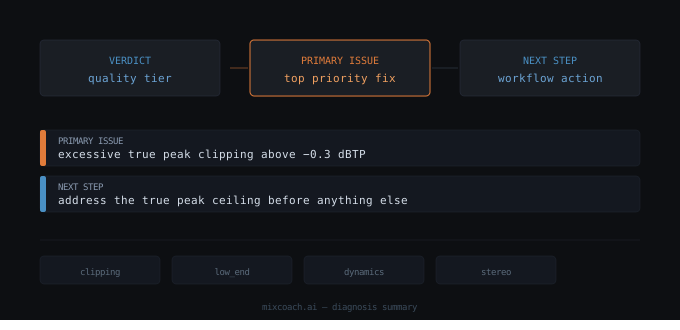
Analysis outputs that present all issues at once without orienting users to where to start create overwhelm. The Primary Issue and Next Step provide a clear starting point before diving into detailed metrics and prescriptions. (Source: inputs/articles/primary-issue-next-step/brief.md#Core message)
What primary-issue-next-step reveals (and why it matters)
Primary Issue and Next Step are two high-level outputs displayed in the diagnosis summary alongside the overall verdict and quality tier. The Primary Issue is a one-line label identifying the top problem, taken directly from the AI's first priority fix. The Next Step is a single sentence of workflow guidance telling the producer what to do first before making any other changes. (Source: inputs/articles/primary-issue-next-step/brief.md#Core message)
These elements are intentionally high-level. The specific numbers and actions live in the prescription section below. Together they give users a clear starting point without overwhelming them.
This matters because analysis tools often dump all findings at once. Mix engineers open their diagnosis and see five different frequency issues, three dynamics concerns, and two stereo problems. Where do you start? Which fix makes the others easier? Which must happen first because other fixes depend on it?
Primary Issue and Next Step cut through that complexity. They tell you exactly what's wrong and what to do first, before you dive into detailed fixes. This prevents wasted effort on secondary problems while critical issues remain unaddressed.
How primary-issue-next-step works: technical methodology
The Primary Issue is generated through direct extraction from the AI's output. MixCoach.ai takes the first item from the AI's priority_fixes array and reads the issue field. That text is lowercased, stripped of trailing punctuation, and prefixed with "Primary issue:". No additional logic is applied. (Source: inputs/articles/primary-issue-next-step/brief.md#Key accuracy requirements)
This extraction happens immediately after the AI returns its prescription. The first priority fix is always the one the AI model ranked as most critical. By surface this label in the diagnosis summary, MixCoach.ai ensures users see the top problem before they scroll through detailed metric cards.
The Next Step follows a different methodology. Rather than extracting text from the AI, MixCoach.ai applies category-based templates through the getNextStep() function. (Source: inputs/articles/primary-issue-next-step/brief.md#Key accuracy requirements)
First, the system detects which issue category the Primary Issue belongs to. MixCoach.ai recognises eight categories: clipping, low_end, high_end, mid_range, dynamics, stereo, loudness, and general. Each category maps to a fixed template that provides workflow guidance.
The templates are prescriptive and sequencing-aware. For example, if the Primary Issue falls into the clipping category, the Next Step will instruct: "Address the true peak ceiling before anything else; all other fixes are secondary until clipping is resolved." If the category is low_end, the guidance shifts: "Separate kick and bass balance in the low end first, then reassess the full mix from there." (Source: inputs/articles/primary-issue-next-step/brief.md#Page structure sections)
These templates encode expert knowledge about fix dependencies. Some problems must be resolved before others can be accurately evaluated. Clipping distorts all frequency analysis. Over-compression affects perceived tonal balance. Stereo coherence issues make spatial decisions unreliable. The Next Step templates capture this sequencing logic and deliver it as a single directive.
If the issue category cannot be determined, the system falls back to the general template: "Address the top priority fix first: [top fix label]." This ensures users always receive actionable guidance, even when the issue doesn't map cleanly to a known category. (Source: inputs/articles/primary-issue-next-step/brief.md#Page structure sections)
Interpreting primary-issue-next-step values and outputs
The Primary Issue will always match one of the eight recognised categories or fall into the general bucket. The label you see in the diagnosis summary is exactly what the AI wrote in its first priority fix, with only minimal formatting applied.
When you read "Primary issue: excessive high-frequency harshness above 8kHz", you're seeing the AI's exact assessment. When you read "Primary issue: kick and bass masking each other in 50-100Hz", that's the precise language the model used to describe the problem. This direct pass-through maintains the AI's specificity and technical accuracy.
The Next Step output will be one of eight fixed templates. Each template is a complete sentence that describes both what to do and why that action comes first in the workflow sequence.
For clipping, the Next Step emphasises prerequisite resolution: you cannot accurately evaluate frequency balance or dynamics while the signal is clipping. All other metrics are corrupted by distortion. The template directs you to address the true peak ceiling before touching anything else.
For low_end issues, the Next Step targets foundational clarity: kick and bass balance establishes the low-frequency foundation for the entire mix. Once that separation is achieved, you can reassess the full mix from a stable starting point.
For high_end issues, the template prevents premature bus processing. Presence and air must be restored in the source tracks before you evaluate whether your bus-chain compression or limiting is appropriate. The Next Step directs you to restore high-frequency clarity first.
For mid_range congestion, the guidance acknowledges that masking in the low-mids affects your perception of the entire tonal balance. Clearing that congestion first lets you hear the full mix accurately, which changes every subsequent tonal decision.
For dynamics problems, the Next Step recognises that over-compression changes perceived frequency response. You must release the over-compression before you can evaluate whether you have a tonal problem or a dynamics problem. The template prevents you from chasing EQ fixes that are really symptoms of gain reduction.
For stereo coherence issues, the guidance prioritises mono compatibility. A stable, mono-compatible stereo image is the foundation for all spatial decisions. Fixing stereo coherence first ensures that panning, width, and spatial effects sit on solid ground.
For loudness mismatches, the Next Step directs you to set the correct loudness target first. Loudness target affects every tonal and dynamic decision. If your target is wrong, all your other adjustments will be calibrated to the wrong reference.
For general issues that don't fit the other categories, the template provides a catch-all directive: address the top priority fix first, and names it explicitly.
Each template reflects the same principle: some problems corrupt your ability to evaluate others. The Next Step tells you which problem must be resolved first so your subsequent decisions are based on accurate perception.
How primary-issue-next-step integrates with other systems
Primary Issue and Next Step appear in the diagnosis summary card, displayed in a three-column layout alongside the overall verdict. Verdict tells you the quality tier. Primary Issue tells you the top problem. Next Step tells you what to do first. This layout creates a visual hierarchy: orient, then dive deeper. (Source: inputs/articles/primary-issue-next-step/brief.md#Page structure sections)
These high-level outputs sit above the metric cards that provide detailed frequency analysis, dynamics measurements, and stereo diagnostics. They're visible before you scroll. This positioning signals their function: orienting context before detailed prescription.
Below the diagnosis summary, the priority fixes table provides the full breakdown. Each row specifies the issue, the severity rating, the metric that flagged it, and the recommended fix with precise frequency ranges and dB adjustments. Primary Issue and Next Step work together with that table. The high-level elements provide orientation. The table provides specification. The two layers prevent information overload at first glance while still delivering complete technical guidance. (Source: inputs/articles/primary-issue-next-step/brief.md#Page structure sections)
The system also handles fallback gracefully. If the AI prescription is unavailable, Primary Issue and Next Step display placeholder text prompting the user to re-upload their mix. This maintains UI consistency and guides the user toward resolving the missing data, rather than leaving blank fields that create confusion. (Source: inputs/articles/primary-issue-next-step/brief.md#Key accuracy requirements)
Practical application and workflow
When you open a diagnosis, read the three-column summary first. Verdict establishes quality context. Primary Issue names the top problem. Next Step tells you what to do before anything else.
If your Next Step says "Address the true peak ceiling before anything else", stop. Open your DAW, check your true peak levels, apply limiting or gain reduction, and re-export. Don't touch EQ. Don't adjust compression. Don't evaluate stereo width. Clipping corrupts all of those metrics. Fix the ceiling first, then run a new diagnosis.
If your Next Step says "Separate kick and bass balance in the low end first", your workflow shifts. Solo your kick and bass tracks. Check the frequency overlap in the 50-100Hz range. Apply subtractive EQ to carve space. Re-export and re-analyse. Once the low-end foundation is stable, the rest of the mix will read differently. Adjustments you thought you needed in the mids or highs may no longer be necessary.
This sequencing prevents backtracking. Fixing clipping first means you don't waste time on EQ adjustments that were compensating for distortion. Fixing low-end masking first means you don't chase phantom mid-range problems that were really caused by muddy fundamentals bleeding upward.
The Primary Issue and Next Step also help you manage cognitive load. Mix engineers working through a diagnosis see dozens of data points. Metrics, graphs, frequency ranges, dB values, severity ratings, recommendations. That volume of information makes it hard to know where to start. These two high-level outputs filter that complexity down to a single starting action. You don't have to synthesise all the data yourself. The system has already identified the top problem and told you the correct first step.
After you complete the Next Step action, re-export your mix and run a new diagnosis. The Primary Issue may change. Problems that seemed critical in the first analysis may resolve as side effects of fixing the primary issue. Problems that were masked by the primary issue may now surface as the new top priority. This iterative workflow, guided by updated Primary Issue and Next Step outputs, creates a logical progression from rough to refined.
Summary and key takeaways
Primary Issue and Next Step provide essential workflow orientation by identifying the top problem and prescribing the correct sequencing for addressing fixes with dependencies. The Primary Issue is extracted directly from the AI's first priority fix, ensuring users see the top-ranked problem immediately. The Next Step applies category-based templates that encode expert knowledge about fix dependencies and sequencing logic.
Together, these elements prevent information overload by providing a clear starting point before detailed prescription. They recognise that some fixes must happen first because they corrupt perception of other issues. Clipping distorts all frequency analysis. Over-compression affects perceived tonal balance. Stereo coherence issues make spatial decisions unreliable.
The correct workflow sequence matters because it prevents wasted effort and eliminates backtracking. By addressing the Primary Issue first, following the Next Step guidance, and re-analysing after each major fix, mix engineers move systematically from rough to refined without chasing phantom problems or compensating for uncorrected foundational issues.