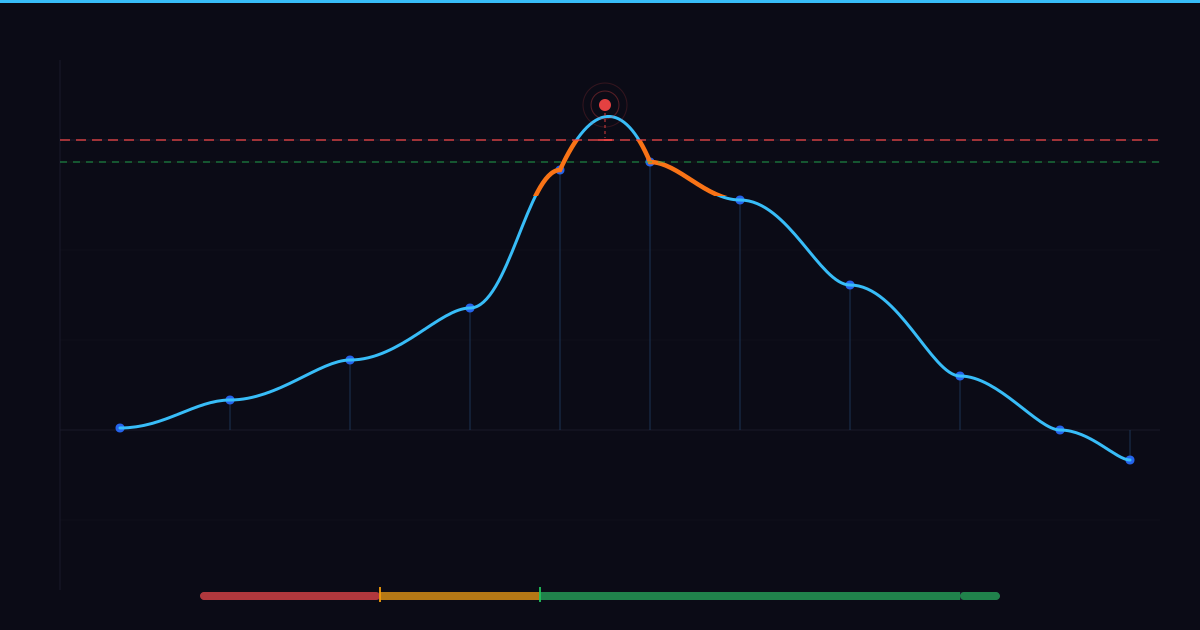
The producer's mix reads −0.2 dBFS on every meter in the DAW: tight, controlled, no red lights. After upload to Spotify, listeners report a faint crunch in the high end. The meters were accurate; they simply were not measuring the right thing.
That gap between what the meters showed and what the codec produced is not an edge case. It is a predictable consequence of how digital audio works, and True Peak is the measurement designed to close it.
Why sample-peak meters are not enough
Standard DAW meters measure sample peaks: the amplitude value at each discrete point in the digital audio stream. These values accurately represent the waveform as a series of stored numbers, but digital audio is a continuous signal that has been sampled. When it is reconstructed for playback or encoded for distribution, the continuous waveform between those sample points can reach amplitudes higher than any of the samples themselves. (Source: inputs/articles/true-peak/brief.md#definition) These excursions are inter-sample peaks: they exist in the continuous signal, fall between digital sample values, and are invisible to a standard sample-peak meter.
The problem surfaces at the distribution stage. When an audio file is encoded to a streaming format such as AAC or OGG, the codec reconstructs the continuous signal from the stored samples. That reconstruction can produce peaks above 0 dBFS, the digital ceiling, even when the input file reads cleanly below it on a sample-peak meter. (Source: inputs/articles/true-peak/brief.md#why-it-matters) The codec is not introducing new distortion; it is revealing peaks that were always present in the waveform but were invisible to the meter.
The audible result is distortion, harshness, and loss of clarity in the encoded file. (Source: inputs/articles/true-peak/brief.md#why-it-matters) Listeners describe this as a crunch or digital edge in an otherwise clean-sounding mix. The source file reads clean; the streamed file does not sound it.
The standard producer workflow stops at the sample-peak meter: green lights, −0.1 dBFS peak, session exported. But that reading describes the file before encoding, and the question streaming platforms answer is different: what does this signal look like after the codec processes it? True Peak answers that question. A standard sample-peak meter reports the highest sample value in the audio stream; True Peak measures the highest amplitude the signal will reach after codec encoding or digital-to-analogue conversion, including the inter-sample excursions the sample meter never registers.
The True Peak diagnostic framework
What True Peak measures
Standard peak meters stop at the sample. True Peak extends the measurement to cover what happens after that data is decoded, accounting for the peaks that arise between sample points in the continuous signal. (Source: inputs/articles/true-peak/brief.md#definition) Where a standard peak measurement reads the stored sample values, True Peak accounts for what the audio will actually look like after conversion or encoding.
The unit is dBTP (decibels True Peak), a scale conceptually similar to dBFS but distinct in what it represents. (Source: inputs/articles/true-peak/brief.md#definition) A reading in dBFS describes the highest sample value in the file. A reading in dBTP describes the highest amplitude the continuous signal will produce after it leaves the digital domain. (Source: inputs/articles/true-peak/brief.md#definition) The two units can differ; that difference is the margin in which distortion hides.
What is True Peak in audio? True Peak measures the highest amplitude a signal will reach after codec encoding, including inter-sample peaks that standard DAW meters do not capture.
What does dBTP mean? dBTP (decibels True Peak) is the unit in which True Peak is expressed. It represents the post-encoding signal, not the pre-encoding sample values.
How MixCoach.ai calculates it
MixCoach.ai detects peaks across both stereo channels and converts the result to dB using logarithmic scaling. (Source: inputs/articles/true-peak/brief.md#how-its-measured) The implementation is a sample-domain measurement: it identifies the highest peak values present in the audio data without performing the oversampling a hardware True Peak limiter uses to reconstruct the continuous inter-sample waveform. (Source: inputs/articles/true-peak/brief.md#how-its-measured)
This design makes the measurement conservative. If MixCoach.ai reports a problem, there is a problem. In borderline cases very close to 0 dBFS, the actual inter-sample peaks after codec encoding may be marginally higher than the reported figure, because the sample-domain approach does not fully simulate post-encoding behaviour. That characteristic is covered in the section on measurement limits. For the purposes of identifying clipping and headroom risk before upload, the approach is reliable.
The three-tier severity model
A dBTP value alone is not enough to make a decision. What matters is which severity tier the reading falls into and what action that tier requires. MixCoach.ai maps every True Peak result to one of three tiers: Critical, Warning, or Good. (Source: inputs/articles/true-peak/brief.md#severity-system)
Critical applies to two conditions. Above 0 dBTP, the signal has already exceeded the digital ceiling before encoding: clipping is present in the exported file regardless of what the DAW meters showed during the session. Near 0 dBTP (roughly 0 to −0.5 dBTP), the file is technically unclipped, but codec encoding for streaming will very likely push it above 0 dBFS. (Source: inputs/articles/true-peak/brief.md#severity-system) Both conditions require corrective action before the file is uploaded.
Warning applies around −1 dBTP (approximately −0.5 to −1.0 dBTP). This sits at or near the widely adopted distribution ceiling for streaming delivery. (Source: inputs/articles/true-peak/brief.md#why-streaming-standards-use-minus-1-dbtp) The file is safe to upload, but the headroom is marginal. Reducing the limiter ceiling slightly before export removes the risk.
Good covers −3 to −1 dBTP: the reliable distribution range with sufficient buffer against codec-induced overshoot for most streaming platforms. (Source: inputs/articles/true-peak/brief.md#severity-system) No corrective action is needed. A reading below −3 dBTP is also Good; if more loudness is a goal, there may be room to revisit the limiter setting. The −1 dBTP ceiling is widely adopted in streaming and broadcast workflows, including by EBU R128, as a practical safeguard against codec-induced peaks. (Source: inputs/articles/true-peak/brief.md#why-streaming-standards-use-minus-1-dbtp)
What True Peak level is safe for streaming? A reading in the Good range (−3 to −1 dBTP) is safe for streaming delivery. The widely adopted ceiling is −1 dBTP; readings between −1 dBTP and 0 dBTP are marginal (Warning); readings at or above 0 dBTP require re-export before upload.
| dBTP range | Severity | Risk | Required action |
|---|---|---|---|
| Above 0 dBTP | Critical | The signal has already clipped; distortion is present in the file | Reduce output gain; lower limiter ceiling; re-export immediately |
| 0 to −0.5 dBTP (approx.) | Critical | The file is unclipped, but codec encoding will very likely push it above 0 dBFS | Lower limiter ceiling to −1.0 dBTP or below; re-export before uploading |
| −0.5 to −1.0 dBTP (approx.) | Warning | Acceptable headroom, but marginal: close to the widely adopted distribution ceiling | Consider lowering the ceiling slightly; safe to upload with awareness |
| −3 to −1 dBTP | Good | Reliable distribution range; sufficient buffer against codec overshoot | No corrective action needed; upload with confidence |
| Below −3 dBTP | Good | Generous headroom. Consider whether additional loudness can be safely achieved | Optional: re-examine limiter ceiling if more loudness is a goal |
True Peak (dBTP) measures the highest amplitude a signal will reach after codec encoding, including inter-sample peaks that standard DAW meters do not show. (Source: inputs/articles/true-peak/brief.md#definition) A reading above 0 dBTP indicates clipping; near 0 dBTP carries high risk of codec-induced distortion; the widely adopted safe ceiling for streaming delivery is −1 dBTP. (Source: inputs/articles/true-peak/brief.md#severity-system) (Source: inputs/articles/true-peak/brief.md#why-streaming-standards-use-minus-1-dbtp) Maintaining at least 1 dB of headroom below 0 dBTP before export is standard practice to prevent distortion in encoded streams.
Reading your True Peak result: a worked example
Three readings from three different export sessions demonstrate the framework in use.
+0.3 dBTP (Critical)
A home studio producer finishes a mix, exports to WAV, and receives a True Peak result of +0.3 dBTP. The DAW peak meter showed −0.1 dBFS throughout the session with no red lights at any point. Above 0 dBTP means the continuous signal has already exceeded the digital ceiling: clipping is present in the exported file before the codec has touched it, because inter-sample peaks exceeded 0 dBFS even while the sample-peak meter registered a safe level. (Source: inputs/articles/true-peak/brief.md#severity-system) The DAW meters are not wrong; they are simply reporting sample peaks, not the inter-sample behaviour the codec will encounter.
The corrective action is to reduce output gain, lower the limiter ceiling, re-export, and check the new True Peak reading before uploading. There is no point uploading the current file; the distortion is already in it. This scenario applies equally to a lossless export: if True Peak is above 0 dBTP, the clipping is in the waveform itself, not introduced by the codec.
−0.3 dBTP (Critical)
A second producer receives −0.3 dBTP. The file is not clipped; 0 dBFS has not been breached. Encoding this file to AAC for streaming will very likely introduce peaks above 0 dBFS, because the sample values are close enough to the ceiling that inter-sample reconstruction pushes the signal over it. (Source: inputs/articles/true-peak/brief.md#why-it-matters) The audible result in the stream is the same: distortion, harshness, and loss of clarity. (Source: inputs/articles/true-peak/brief.md#why-it-matters)
The distinction from the first scenario matters for understanding where the problem originates. In the first scenario, the clipping already exists in the WAV file. In the second scenario, the WAV is clean but will not survive lossy encoding without overshoot. The corrective action is the same: lower the limiter ceiling to −1.0 dBTP or below and re-export before uploading.
−1.8 dBTP (Good)
A third producer receives −1.8 dBTP. The file is within the Good range and has sufficient headroom against codec-induced overshoot. (Source: inputs/articles/true-peak/brief.md#severity-system) No corrective action is needed before upload.
All three sessions could look identical on the DAW's sample-peak meters. The True Peak reading is the only output that distinguishes them and determines what happens next.
My True Peak reads above 0 dBTP. What should I do? Lower the output gain or reduce the limiter ceiling. Re-export. Target the Good range (−3 to −1 dBTP). Check the new True Peak reading before uploading. A file with a Critical True Peak reading carries distortion before the codec processes it; uploading it delivers a distorted stream.
Where True Peak measurement has limits
The MixCoach.ai implementation is a sample-domain measurement. It detects peaks at the sample level but does not perform oversampling to reconstruct the continuous inter-sample waveform the way a dedicated hardware True Peak limiter would. (Source: inputs/articles/true-peak/brief.md#how-its-measured)
The consequence is a conservative instrument. If the tool reports a Critical or Warning reading, the reading is reliable: the file has a problem. In borderline cases very close to 0 dBFS, the actual inter-sample peaks after codec encoding may be marginally higher than the reported figure, because the sample-domain approach does not fully reconstruct the post-encoding signal. The tool will not underestimate severe problems; it may slightly underestimate the degree of risk in the narrowest borderline cases near 0 dBFS.
Is MixCoach.ai True Peak measurement the same as a hardware true peak limiter? No. A hardware True Peak limiter uses oversampling to detect and suppress inter-sample peaks in real time. MixCoach.ai uses a sample-domain approach that identifies peaks in the audio data. For pre-distribution diagnostics and clipping detection, the approach is reliable. The distinction from a full oversampled detector matters only in the most marginal cases near 0 dBFS.
True Peak also does not replace critical listening. A Good reading (−3 to −1 dBTP) means the headroom against codec overshoot is reliable. It does not indicate whether the limiter has introduced pumping artefacts, whether an earlier gain stage clipped before the signal reached the output, or whether saturation further up the chain has altered the character of the mix. Measurement identifies the True Peak problem; listening identifies everything else.
Within the MixCoach.ai quality score, True Peak is not treated as an advisory flag. High True Peak values carry penalties on the quality tier score and influence the overall mix verdict as a primary safety metric. (Source: inputs/articles/true-peak/brief.md#relationship-to-other-metrics) A mix that reads Critical on True Peak does not pass the quality tier because other metrics look acceptable.
True Peak in one sentence
The producer from the opening scenario did not have a clipping problem before export. The clipping appeared after the codec reconstructed the signal and the inter-sample peaks the meters never registered became audible in the stream.
True Peak is the measurement that closes that gap: the highest amplitude the signal will reach after encoding, expressed in dBTP, assessed against a three-tier severity model that determines whether a file needs re-export or is ready to upload with confidence.
Check True Peak before every upload. Target the Good range (−3 to −1 dBTP). If a reading comes back as Warning or Critical, lower the limiter ceiling and re-export before the file reaches the codec. The DAW meter shows what the samples say; True Peak shows what the encoded stream will sound like.